
Google Play Error 907 is a bug in the Play Store. The full error message would be similar to the app name could not be downloaded due to an error. (907). This has surfaced after the Play Store has been updated by Google. This error usually occurs when you try or try to download an app from the Play Store.
Tracing debugging errors indicates permission issues when Play Store attempts to download and save part of the app to the SD card.

Follow the steps below to resolve this issue.
1. Go to Settings -> All and select Google Play Store
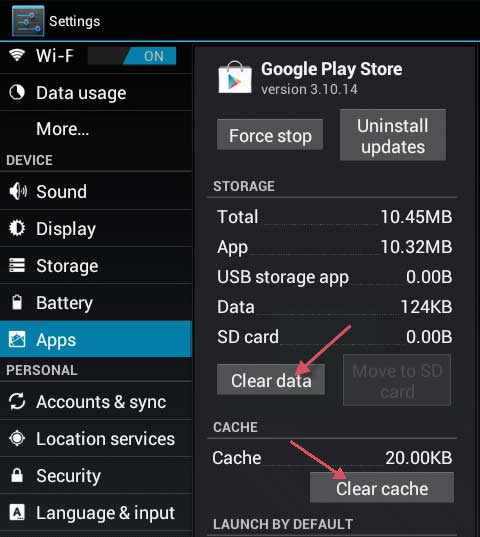
2. Tap or select Force Stop. Then tap / Select Clear Data, then Clear Cache.
3. Once this is done, try to install the app now. If it still does not work, go to step 4
4. Go to Application Settings -> All -> Google Play Store and select Uninstall Updates.
5. Reopen Play Store and wait a few minutes (make sure your phone can access the Internet).
Test if you can download the app now. If not, go to step 6.
6. Go back to Settings -> Select memory and select Unmount SD card
Test if you can download the app now. If not, then go to step 7.
7. This time, eject the SD card and repeat the test.
If it still does not work, repeat steps (1 through 4) and you should be able to get it up and running.


