How Is AI and AWS Helping Clinical Staff Have More Human Conversations With Patients?

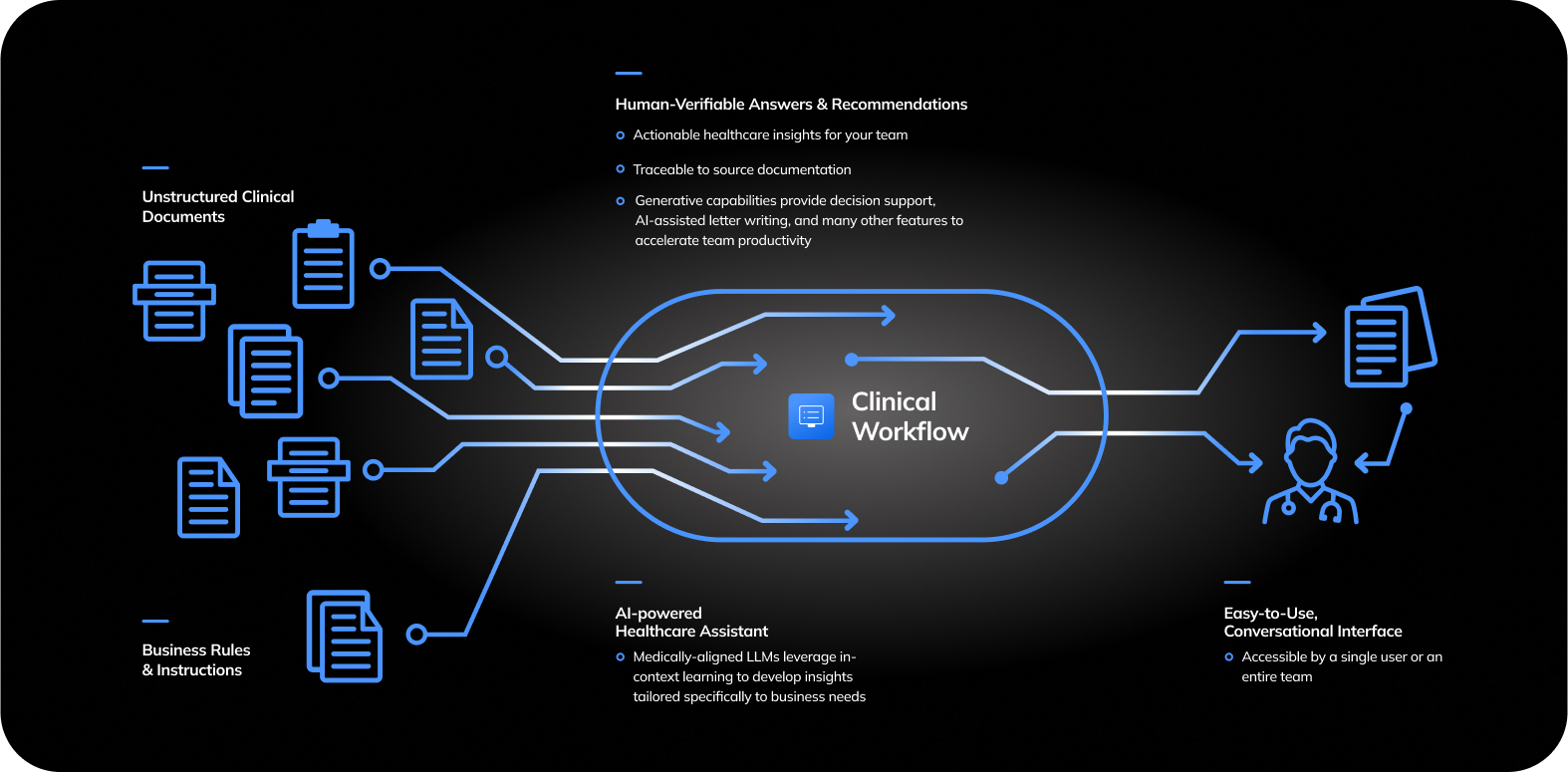
That’s exactly the problem medical cannabis startup Montu set out to solve. As its patient base grew rapidly, Montu needed a way to scale without turning clinical conversations into rushed, impersonal calls. The answer came from a thoughtful combination of AI, cloud infrastructure, and Amazon Connect, all built on AWS.

Let’s break down how AI is quietly helping clinical staff have more human conversations and why this matters far beyond one fast growing healthcare company.


The Real Problem Isn’t Technology. It’s Cognitive Load.

Clinicians don’t struggle because they don’t care.
They struggle because they’re overloaded.

A typical clinical conversation today often looks like this:

  • Reviewing patient history across multiple systems
  • Confirming identity and compliance requirements
  • Documenting notes in real time
  • Navigating scheduling or follow-up steps
  • Managing call queues or appointment backlogs

All of this happens while trying to listen, empathize, and respond thoughtfully.

What this really means is that the clinician’s attention is split. Not because they want it to be, but because the system demands it.

AI’s role here isn’t to speak for clinicians. It’s to remove friction so clinicians can focus on being present.


Why Human Conversations Matter More in Medical Cannabis

Medical cannabis sits at a unique intersection of healthcare.

Patients often come in with:

  • Anxiety or chronic pain
  • Previous negative healthcare experiences
  • Confusion about legality, dosage, or side effects
  • A need for reassurance, not judgment

These are not checkbox conversations. They require trust.

For Montu, scaling meant handling a rapidly growing number of patient interactions without losing the empathy that made the service work in the first place. That’s where AI powered contact center technology became a strategic decision, not just an operational one.


How Amazon Connect Changes the Shape of Clinical Conversations

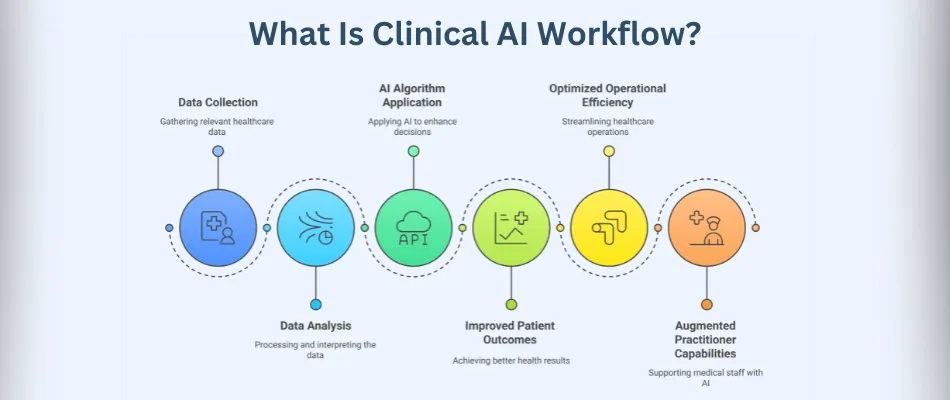
At its core, Amazon Connect is a cloud based contact center designed to handle voice, chat, and messaging at scale. But its real power in healthcare comes from how it integrates with AI and data.

Here’s what changes when clinical teams use Amazon Connect.

One View of the Patient, Not Five Tabs

Instead of switching between systems, clinicians can see:

  • Patient history
  • Previous conversations
  • Notes and outcomes
  • Appointment context

All in one interface.

This reduces mental overhead. The clinician doesn’t start the call scrambling for context. They start informed, calm, and ready to listen.

Intelligent Call Routing That Respects People’s Time

AI driven routing ensures patients are connected to the right clinician based on:

  • Medical needs
  • Availability
  • Previous interactions

This avoids repetitive explanations and long wait times. Patients feel seen. Clinicians feel prepared.


Image
Image
Image
Image

AI as a Silent Assistant, Not a Replacement

There’s a lot of noise around AI replacing jobs. In clinical care, that framing misses the point.

At Montu, AI plays a background role. It doesn’t diagnose. It doesn’t prescribe. It supports.

Here’s how.

Automated Transcription and Note Taking

AI can transcribe conversations in real time and structure notes automatically.

That means:

  • Less typing during calls
  • Better eye contact and listening
  • More accurate records after the conversation ends

The clinician stays engaged. The documentation still gets done.

Smart Prompts, Not Scripts

AI can surface relevant prompts during a conversation:

  • Follow-up questions
  • Compliance reminders
  • Patient specific considerations

These aren’t rigid scripts. They’re gentle nudges that help clinicians avoid missing important details while keeping the conversation natural.


Scaling Without Losing the Human Touch

Most startups hit a breaking point when growth outpaces systems.

Montu faced a classic challenge:

  • More patients
  • More clinicians
  • More interactions
  • The same expectation of care quality

Traditional scaling often leads to:

  • Shorter calls
  • More rigid processes
  • Burned out staff

By building on AWS and Amazon Connect, Montu scaled infrastructure first, not pressure.

Elastic Infrastructure That Grows With Demand

Cloud based systems mean capacity adjusts automatically.

Busy periods don’t overwhelm clinicians. Quiet periods don’t waste resources. This balance keeps workloads sustainable, which directly impacts how clinicians show up in conversations.

Data Driven Insights Without Micromanagement

AI analytics help identify:

  • Where patients drop off
  • Which conversations take longer
  • Where clinicians need support or training

This isn’t about surveillance. It’s about understanding patterns so teams can improve together.


The Emotional Impact on Clinical Staff

Here’s something that often gets overlooked.

When systems are better, clinicians feel better.

Reduced admin load leads to:

  • Less fatigue
  • More patience
  • Better emotional regulation

And patients can feel the difference.

A clinician who isn’t rushing.
A pause that isn’t filled with keyboard noise.
A response that acknowledges emotion, not just symptoms.

AI doesn’t create empathy. It makes space for it.


Trust, Compliance, and Security on AWS

Healthcare conversations carry sensitive information. For Montu, trust wasn’t negotiable.

AWS provides:

  • Enterprise grade security
  • Compliance frameworks aligned with healthcare standards
  • Encrypted data at rest and in transit

This allows clinical teams to focus on care, not fear of breaches or system failures.

Patients don’t see the infrastructure. They feel the confidence it creates.


What This Means for the Future of Healthcare Conversations

Montu’s experience highlights a broader shift happening across healthcare.

The next generation of clinical tools won’t be judged by how advanced they are. They’ll be judged by how invisible they become.

The best AI in healthcare:

  • Reduces friction
  • Amplifies listening
  • Supports human judgment
  • Disappears into the background

As healthcare systems grow more complex, the role of AI is to simplify the human experience on both sides of the conversation.


Key Takeaways for Healthcare Leaders

If you’re thinking about AI in healthcare, here’s what matters.

  1. Start with the conversation, not the technology
  2. Use AI to remove cognitive load, not replace empathy
  3. Choose platforms that scale without rigidity
  4. Measure success by patient trust and staff wellbeing

Montu’s approach shows that growth and humanity don’t have to be trade-offs.

With the right use of AI and AWS powered tools like Amazon Connect, they can reinforce each other.


Final Thought

Here’s the thing.

Patients don’t remember how advanced your systems are.
They remember how the conversation made them feel.

AI, when used thoughtfully, doesn’t make healthcare colder.
It gives clinicians the space to be warmer.

And that might be its most important contribution of all.
Related Keywords

AWS Explained What It Is What It Does and Where It’s Headed in 2026

If you use the internet, you’re already using AWS. Maybe not directly. But the apps you open, the videos you stream, the files you upload, and the services you depend on every day are very likely running on it and here it is AWS Explained

That’s not hype. That’s just how much ground Amazon Web Services covers.

This post breaks AWS down properly. What it is. What it actually does behind the scenes. Why businesses rely on it. How its current features work. And what AWS is preparing to launch as we move into 2026.

No fluff. No jargon walls. Just a clear explanation you can actually understand.


What Is AWS?

Amazon Web Services, commonly called AWS, is a cloud computing platform that provides on-demand access to computing power, storage, databases, networking, security, analytics, artificial intelligence, and more.

Instead of owning physical servers, companies rent infrastructure from AWS over the internet.

Think of AWS as a global utility for computing. Just like electricity or water, you use what you need, when you need it, and you pay only for what you consume.

AWS launched in 2006. What started as a few internal tools Amazon built for itself turned into the backbone of modern digital business.

Today, AWS runs millions of workloads across startups, governments, enterprises, and everything in between.


Why AWS Exists in the First Place

Here’s the thing. Before cloud computing, running software was painful.

Companies had to:

  • Buy servers upfront
  • Guess future traffic
  • Maintain hardware
  • Handle downtime themselves
  • Scale slowly and expensively

AWS flipped that model.

Instead of guessing and buying, you provision resources instantly. Instead of worrying about hardware failures, AWS handles the infrastructure. Instead of scaling over months, you scale in seconds.

What this really means is simple. AWS lets businesses focus on building products instead of managing machines.

Image

How AWS Actually Works

At its core, AWS is a massive network of data centers spread across the world.

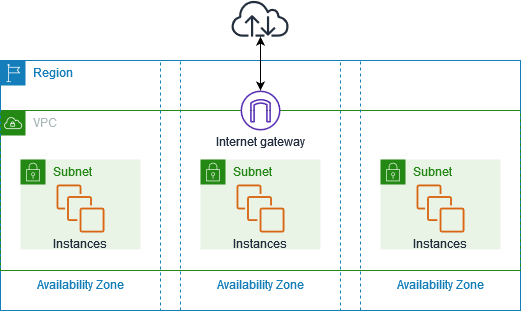
These data centers are grouped into:

  • Regions: Geographic areas like US East, Europe, Asia Pacific
  • Availability Zones: Physically separate locations within each region

This design matters because it enables:

  • High availability
  • Fault tolerance
  • Low latency
  • Disaster recovery

When you deploy an application on AWS, it doesn’t live on one server in one building. It runs across multiple systems designed to survive failure without users noticing.


Core AWS Services Explained

Let’s break AWS down into its major building blocks.


Compute Services

Image
Image
Image

Compute services are about running code.

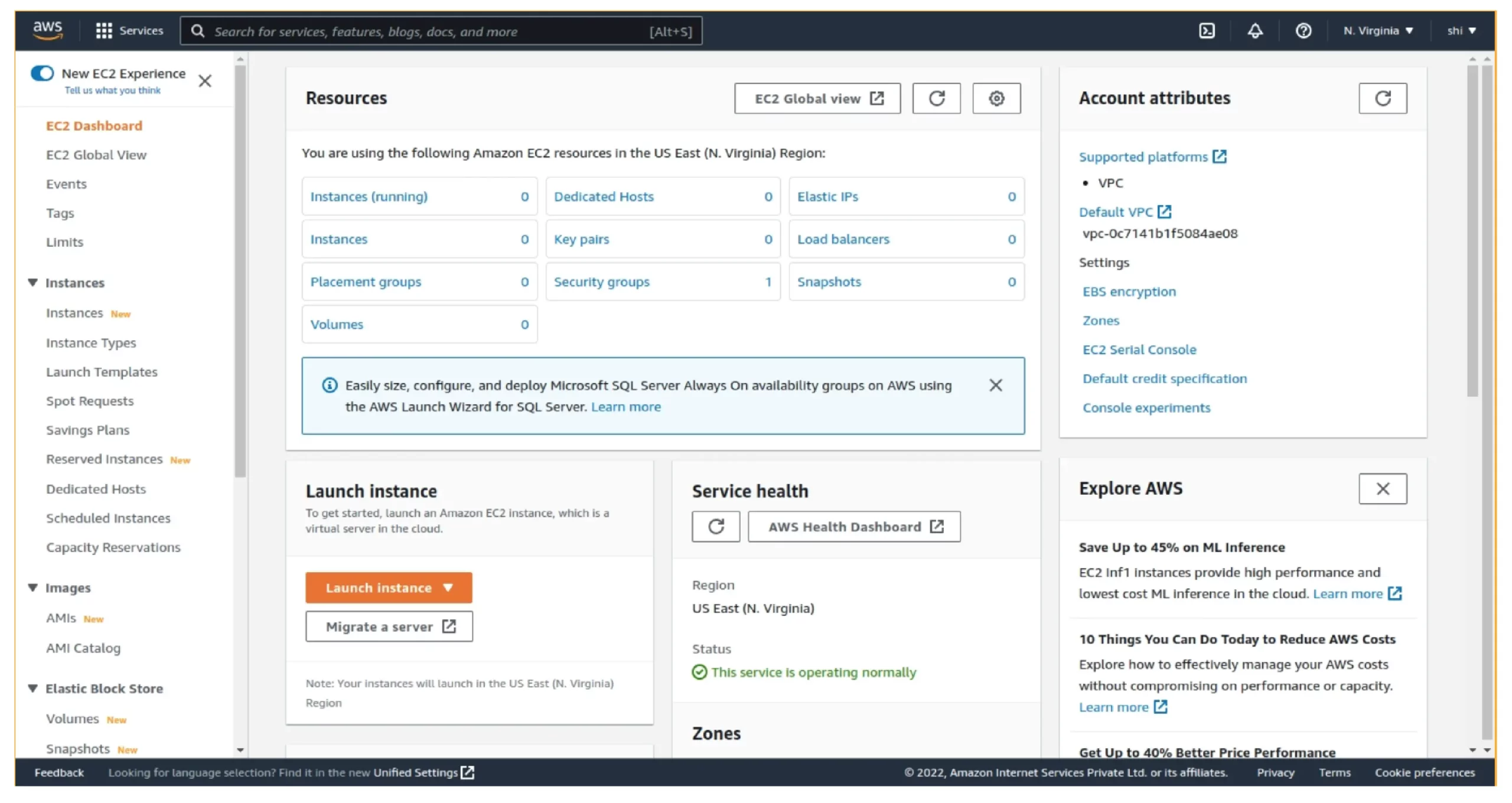
Amazon EC2

EC2 provides virtual servers in the cloud. You choose the operating system, CPU, memory, storage, and networking.

Use EC2 when you need:

  • Full control over your environment
  • Custom software stacks
  • Predictable workloads

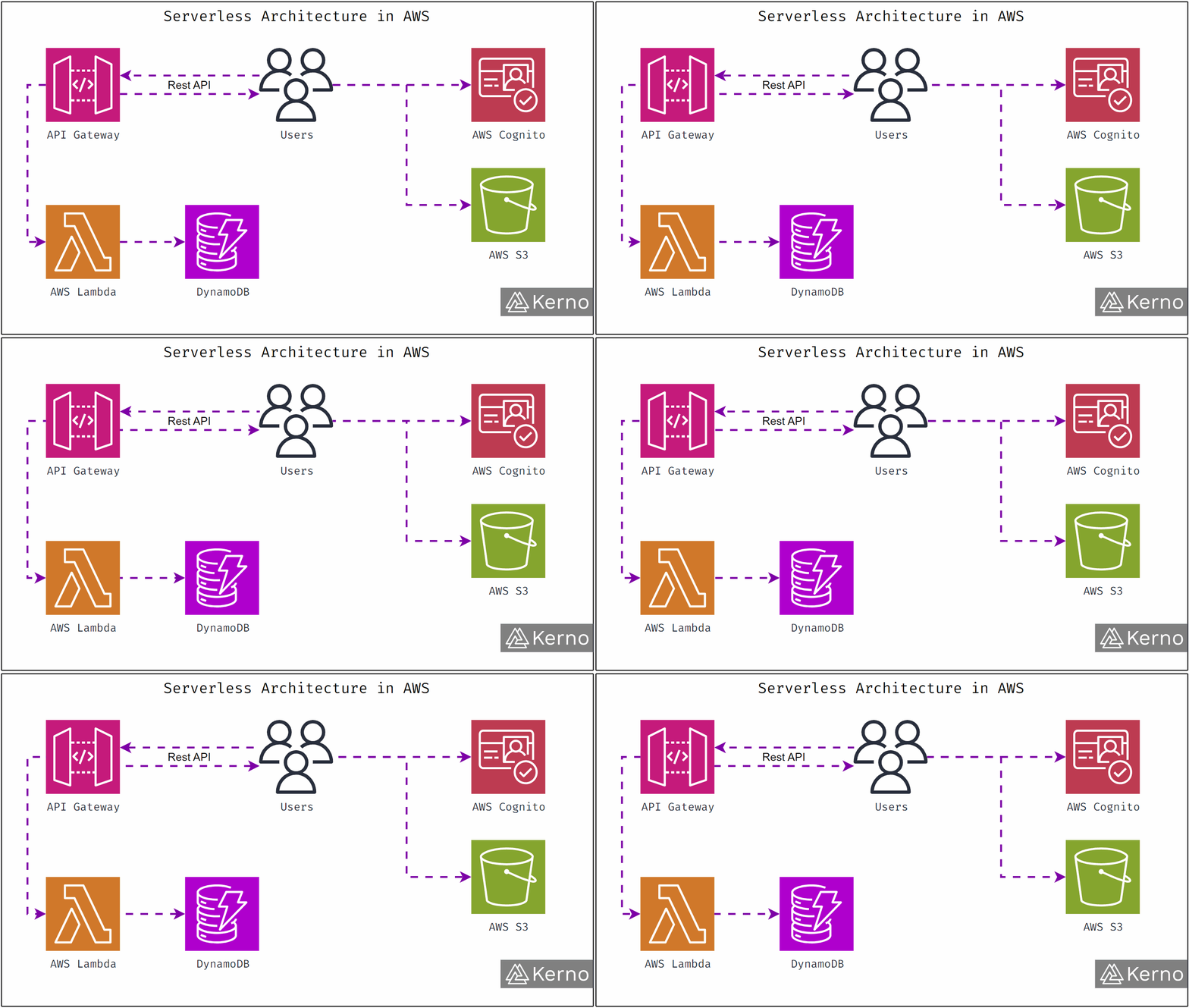
AWS Lambda

Lambda runs your code without servers. You upload functions. AWS runs them automatically when triggered.

This is called serverless computing.

You don’t manage infrastructure. You don’t pay when nothing runs. You only pay per execution.

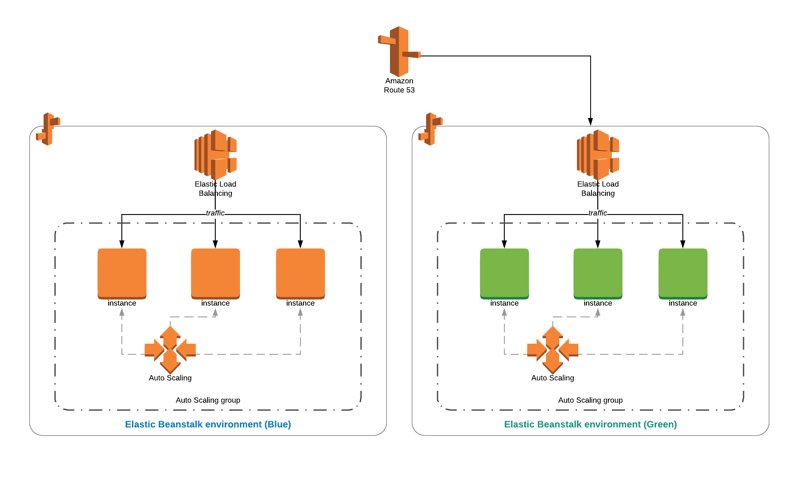
Elastic Beanstalk

Beanstalk handles deployment, scaling, and monitoring for you. You upload code. AWS manages the rest.

Great for teams that want speed without deep infrastructure work.


Storage Services

Image
Image
Image

Storage is where data lives.

Amazon S3

S3 stores objects like images, videos, backups, and static files.

It’s:

  • Highly durable
  • Massively scalable
  • Globally accessible

S3 is one of the most widely used cloud storage systems on Earth.

Amazon EBS

Elastic Block Store provides storage volumes for EC2 instances. Think of it as cloud hard drives.

Amazon Glacier

Glacier is designed for long-term archival storage. It’s cheap, slow to access, and ideal for compliance and backups.


Database Services

Databases store structured and unstructured data.

Amazon RDS

RDS manages relational databases like MySQL, PostgreSQL, and Oracle.

AWS handles:

  • Patching
  • Backups
  • Scaling
  • Failover
Image

Amazon DynamoDB

DynamoDB is a fully managed NoSQL database built for massive scale and low latency.

Used when:

  • Performance must be consistent
  • Data grows unpredictably
  • Global access is required

Amazon Aurora

Aurora is a cloud-native relational database built for speed and resilience.


Networking and Content Delivery

Image
Image
Image

Amazon VPC

VPC lets you create private networks inside AWS. You control IP ranges, routing, and security rules.

Amazon CloudFront

CloudFront is AWS’s content delivery network. It caches content close to users worldwide, reducing latency.

Amazon Route 53

Route 53 handles DNS and traffic routing with high reliability.


Security and Identity

Security is baked into AWS by design.

AWS IAM

Identity and Access Management controls who can access what.

Permissions are granular and auditable.

AWS Shield

Shield protects against DDoS attacks.

AWS KMS

Key Management Service handles encryption keys for secure data protection.


Analytics and Big Data

AWS processes massive data sets.

Amazon Redshift

A data warehouse for analytics at scale.

AWS Glue

ETL service for preparing and moving data.

Amazon Athena

Run SQL queries directly on S3 data without managing servers.


Artificial Intelligence and Machine Learning

Image
Image
Image

AWS offers AI without requiring deep ML expertise.

Amazon SageMaker

Build, train, and deploy machine learning models in one platform.

Amazon Rekognition

Analyze images and videos for faces, objects, and text.

Amazon Comprehend

Natural language processing for text analysis.


DevOps and Automation

AWS supports modern development workflows.

AWS CloudFormation

Infrastructure as code. Define resources using templates.

AWS CodePipeline

Automated CI/CD pipelines.

AWS CloudWatch

Monitoring, logging, and alerting.


What AWS Is Used For in the Real World

AWS powers:

  • Streaming platforms
  • E-commerce systems
  • Financial services
  • Healthcare platforms
  • Gaming infrastructure
  • Government systems
  • AI startups

Startups use AWS to move fast. Enterprises use AWS to modernize legacy systems. Governments use AWS for scalability and security.

Different goals. Same platform.


AWS Pricing Explained Simply

AWS pricing is pay-as-you-go.

You pay for:

  • Compute time
  • Storage used
  • Data transferred
  • Requests processed

There are no upfront costs unless you choose reserved pricing for discounts.

This model:

  • Reduces risk
  • Enables experimentation
  • Matches cost with usage

Why Businesses Choose AWS Over Others

AWS isn’t the only cloud provider. But it leads for reasons that matter.

  • Largest service portfolio
  • Deep enterprise adoption
  • Global infrastructure
  • Mature security model
  • Massive ecosystem
  • Strong developer tooling

It’s not perfect. But it’s flexible, powerful, and proven at scale.


AWS in 2025: Current Feature Highlights

As of now, AWS focuses on five big themes.

Serverless Expansion

More services support event-driven, serverless architectures.

AI Everywhere

AI capabilities are being embedded into analytics, databases, and developer tools.

Sustainability

AWS continues to invest in energy-efficient data centers and carbon-aware workloads.

Industry-Specific Cloud Solutions

Dedicated offerings for healthcare, finance, and manufacturing.

Edge Computing

AWS is pushing compute closer to users with edge services.


What’s Coming Next: AWS Roadmap Toward 2026

While AWS doesn’t reveal everything publicly, patterns are clear.

Here’s where AWS is heading.


1. Smarter AI Infrastructure

AWS is doubling down on custom silicon and optimized AI stacks.

Expect:

  • Faster training
  • Lower inference costs
  • Deeper AI integration across services

AI won’t be a separate product. It’ll be part of everything.


2. More Autonomous Cloud Operations

AWS is moving toward self-healing infrastructure.

This means:

  • Automated performance tuning
  • Predictive scaling
  • Proactive security remediation

Less manual work. Fewer surprises.


3. Simplified Multi-Cloud and Hybrid Support

Businesses don’t want lock-in. AWS knows this.

Expect:

  • Better cross-cloud tooling
  • Easier on-prem integration
  • Unified management layers

4. Developer Experience Overhaul

AWS tools are powerful, but complex.

By 2026, expect:

  • Cleaner interfaces
  • Smarter defaults
  • More opinionated frameworks
  • AI-assisted development

Less setup. More building.


5. Industry-Focused AI Models

Instead of generic models, AWS is moving toward domain-specific intelligence.

Think:

  • Healthcare diagnostics
  • Financial risk analysis
  • Manufacturing optimization
  • Legal document understanding

6. Quantum and Advanced Computing

Quantum computing won’t be mainstream yet. But AWS will continue expanding research access and simulation capabilities.

This positions AWS for long-term breakthroughs.


AWS Explained for Beginners

If you’re new, here’s the short version.

AWS lets you:

  • Build apps without owning servers
  • Scale instantly
  • Pay only for what you use
  • Access advanced tools without massive investment

You don’t need to understand everything on day one. Most teams start small and grow into the platform.


AWS Explained for Businesses

For businesses, AWS means:

  • Faster time to market
  • Lower infrastructure risk
  • Global reach
  • Built-in security
  • Future-proof architecture

It’s not about technology for its own sake. It’s about agility.


Common Misconceptions About AWS

Let’s clear a few things up.

AWS Is Only for Big Companies

False. Many startups run entirely on AWS.

AWS Is Too Expensive

Only if mismanaged. When used properly, it’s often cheaper than on-prem infrastructure.

AWS Is Insecure

AWS provides strong security controls. Most breaches happen due to configuration errors, not platform flaws.


The Future of AWS Explained Simply

AWS isn’t slowing down.

It’s evolving from infrastructure provider to intelligent platform. One that understands workloads, optimizes itself, and supports innovation at every level.

By 2026, AWS will feel less like a collection of services and more like a cohesive operating system for the cloud.

That’s the direction. And everything AWS is building points there.


Final Thoughts

AWS changed how software is built, deployed, and scaled.

It removed barriers. It reduced risk. It gave builders leverage.

Whether you’re a developer, founder, architect, or decision-maker, understanding AWS isn’t optional anymore.

It’s foundational.

And now, you know exactly why.


Meta Description (160 Characters)

AWS explained in simple terms. Learn what AWS is, how it works, current features, real use cases, and what AWS plans to launch by 2026.


Keywords

AWS explained, what is AWS, Amazon Web Services, AWS cloud computing, AWS services, AWS features, AWS roadmap 2026, AWS future, AWS infrastructure, AWS platform

The shape of things: new cloud technology in 2026

Below I unpack the most important shifts, why they matter, and what teams should do next. The keyword to keep in mind throughout is new cloud technology — that phrase captures not a single product but a set of architectural, operational, and business changes that together redefine how organizations run software and data.


A quick snapshot: what “new cloud technology” means in 2026

“New cloud technology” in 2026 is shorthand for a few converging forces:

  • AI-native clouds and data fabrics that put model training and inference first.
  • Hybrid and multicloud systems that let data live where it’s cheapest, fastest, or most compliant.
  • Serverless and edge functions that move compute close to users and sensors.
  • FinOps and autonomous cost governance baked into platforms.
  • Quantum-aware and AI-driven security built into the infrastructure stack.

These aren’t theoretical. Enterprise roadmaps and analyst reports show cloud vendors and customers treating AI, sustainability, and operational automation as core cloud features—not optional add-ons. Deloitte+1


Trend 1 — AI-native cloud: infrastructure designed for models, not just VMs

What this really means is cloud providers stopped treating AI as “an app” and started designing platforms for the lifecycle of ML: data ingestion, training at scale, model registry, low-latency inference, observability for models, and model governance. Instead of stitching together GPUs in silos, hyperscalers and major cloud vendors provide integrated toolchains and optimized hardware stacks that reduce friction from research to production.

Why it matters: AI workloads are the dominant driver of capital spending for hyperscalers and enterprise cloud budgets. That changes economics, design patterns, and capacity planning—forcing teams to think about models, data pipelines, and inference SLAs rather than just servers and networking. Analysts and vendor reports emphasize that cloud providers are making significant investments in AI stacks and accelerators. Investors.com+1

What to do now:

  • Treat model lifecycle tooling as part of platform engineering.
  • Build clear data contracts and observability around model inputs and outputs.
  • Plan for mixed compute footprints: on-prem GPUs + cloud accelerators.

Trend 2 — Hybrid multicloud and the rise of the data control plane

There’s a subtle shift: businesses want their compute to be elastic, their data to be portable, and their policies to be unified. That’s the data control plane: an abstraction that lets you define policies (security, compliance, data access), and then enforces them whether the dataset lives in a hyperscaler, private cloud, or edge site.

Why it matters: moving petabytes isn’t realistic or cheap. Instead, teams move compute to data or replicate minimal, governed slices of data. Industry research shows unified hybrid-multicloud data strategies trending strongly in 2026 planning cycles. The New Stack+1

What to do now:

  • Invest in data catalogs and universal schemas that make it trivial to run the same pipeline across providers.
  • Avoid vendor lock-in by keeping orchestration and policy definitions declarative and portable.
  • Start small with a “bring compute to data” pilot for one latency-sensitive workload.

Trend 3 — Serverless, but smarter: stateful functions, edge serverless, and predictable costs

Serverless stopped being only about stateless event handlers. By 2026, serverless includes stateful functions, better local state caching, long-running workflows, and edge deployments that run milliseconds from users. The old complaint—“serverless is unpredictable cost-wise and limited in capability”—is being met by better metering and more flexible function runtimes.

Why it matters: developers get velocity without being hostage to VM management, and ops gets better visibility and FinOps controls. Serverless at the edge means personalization, AR/VR experiences, and real-time analytics without round-trip to a central region. Reports and practitioner write-ups show serverless adoption rising sharply across enterprises. middleware.io+1

What to do now:

  • Re-architect microservices where cold starts and startup latency matter.
  • Adopt function-level observability and budget alerts.
  • Evaluate edge function providers for use cases requiring <20ms latency.

Trend 4 — FinOps and autonomous cost governance

Cloud costs kept surprising teams. The response is not austerity; it’s automation. FinOps in 2026 is an operational layer: automated rightsizing, anomaly detection for runaway charges, and chargeback systems that are integrated with CI/CD and deployments. More interesting: platforms are starting to recommend (or auto-switch) cheaper resource classes for non-critical workloads.

Why it matters: the economy and competitive pressures make predictable cloud costs strategic. FinOps becomes a governance function that touches engineering, finance, and product. Firms that adopt programmatic cost governance gain the flexibility to scale without surprise bills. Analyst and vendor content repeatedly shows cost governance and FinOps becoming standard practice. cloudkeeper.com

What to do now:

  • Embed cost checks into CI pipelines.
  • Create cost-ownership for teams and automate budget enforcement.
  • Use rightsizing tools and commit to a cadence of cost reviews.

Trend 5 — Security plus AI: automated defense, but also new attack surfaces

Cloud platforms are embedding AI into security—threat detection, behavior baselining, anomaly scoring, and automated remediation. That helps, but it also changes the attack surface: malicious actors use AI to automate phishing, craft supply-chain attacks, and exploit misconfigurations at scale. Security teams must adopt AI as both a tool and a threat vector.

Why it matters: the speed and scale of AI-driven attacks make manual security playbooks obsolete. Organizations require automated, model-aware security controls and continuous validation of cryptographic and access policies. The tech press and security analyses for 2026 warn about rising AI-powered attacks and the risks of over-centralization with major cloud providers. Tom’s Guide+1

What to do now:

  • Shift to continuous security validation and automated patching.
  • Add AI-threat modeling to your red-team playbooks.
  • Prioritize least-privilege across service accounts and model access.

Trend 6 — Sustainability and power-aware cloud design

AI and hyperscale data centers consume huge amounts of power. In 2026, sustainability is no longer only a PR goal—it’s an operational constraint. Expect more transparent carbon metrics built into cloud dashboards, energy-aware autoscaling, and partnerships to source renewables or novel microgrids for data centers. Financial and regulatory pressure means sustainability will influence provider selection and architecture decisions. Barron’s

What to do now:

  • Track carbon metrics alongside cost and performance KPIs.
  • Prefer regions and architectures with explicit renewable commitments for non-latency-critical workloads.
  • Consider hybrid placement to shift energy-intensive training to environments with cleaner power.

Trend 7 — Edge + 5G + localized compute for real-time experiences

Edge computing matured. Where once edge was experimental, in 2026 it’s common for IoT, AR/VR, real-time video inference, and industrial control. 5G availability and cheaper edge hardware let teams move low-latency tasks off the central cloud. The hybrid control plane manages lifecycle and policy; the edge executes low-latency inference and local state.

Why it matters: user experience and physical world interaction depend on <10–20ms response times. Central cloud alone can’t provide that. Enterprises that require real-time decisioning (autonomous vehicles, factory control, live personalization) must adopt edge-first patterns.

What to do now:

  • Design data schemas for segmented synchronization (only sync what you need).
  • Build resilient behavior for intermittent connectivity.
  • Use edge simulators in CI to validate real-world degradations.

Trend 8 — Quantum readiness and post-quantum cryptography

Quantum computing hasn’t broken everything—yet. But organizations are preparing. In 2026, “quantum-ready” means two things: (1) vendors are offering pathways to hybrid quantum-classical workloads for specific algorithms, and (2) cloud security teams are beginning to adopt post-quantum cryptographic standards for sensitive data. The long-lead nature of crypto migration makes early planning sensible.

Why it matters: attackers could be harvesting encrypted data now with the expectation of decrypting it later. For high-sensitivity archives (healthcare, national security, IP), preparing for quantum-safe cryptography is a risk management decision. Industry analyses and cloud vendor roadmaps indicate growing attention to quantum resilience. American Chase+1

What to do now:

  • Classify data by long-term sensitivity and plan migration to quantum-safe algorithms where needed.
  • Watch vendor roadmaps for supported post-quantum ciphers and key-management capabilities.
  • Avoid ad-hoc cryptographic choices—centralize key lifecycle and audits.

Trend 9 — Composable platforms: APIs, data contracts, and platform engineering as first-class citizens

The new cloud technology era prizes composition. Teams assemble capabilities via APIs and data contracts instead of building monoliths. Platform engineering, internal developer platforms, and self-service stacks are now core investments. The aim is clear: let product teams move fast while reducing cognitive load and operational toil.

Why it matters: with complex hybrid, AI, and edge landscapes, the only way to scale is to decouple teams with solid contracts and guardrails. This reduces risk and improves velocity.

What to do now:

  • Define data contracts and SLAs early.
  • Invest in internal platforms that wrap common patterns (observability, deployments, secrets).
  • Use declarative infrastructure and policy-as-code.

Common pitfalls and how to avoid them

  1. Treating AI like a feature: Don’t bolt AI onto old architectures. Model lifecycle, data labeling, and explainability need design.
  2. Ignoring FinOps until it’s out of control: Make cost governance part of delivery pipelines.
  3. Over-centralizing everything: Single-provider convenience comes with concentration risk—policy failures cascade.
  4. Neglecting post-deployment model monitoring: Models drift; monitoring must be continuous.
  5. Choosing the flashiest provider tech without migration plans: Proof-of-concept wins can turn into lock-in losses.

Address these by focusing on small, reversible experiments, automated governance, and clear ownership of cost and security.


How teams should prioritize in 2026

If you can only do three things this year, make them these:

  1. Model-first platform work — Build or buy an MLOps pipeline that includes training reproducibility, model registries, and inference observability. Prioritize backlog items that reduce time-to-production for model updates. Google Cloud
  2. Automated FinOps & governance — Implement cost controls in CI and deploy rightsizing automation. Make budgeting and cost ownership visible to engineering leaders. cloudkeeper.com
  3. Hybrid data control plane pilot — Choose one workload where data residency or latency matters and run a pilot that keeps data local but makes compute portable. Measure latency, cost, and policy complexity. The New Stack

These moves attack velocity, cost, and compliance—three constraints that define cloud success in 2026.


A practical 90-day plan for platform leads

Week 0–4: Inventory and triage

  • Map critical datasets, compute-intensive workloads, and model owners.
  • Run a cloud bill audit and tag resources.

Week 5–8: Low-friction wins

  • Add cost checks to CI and automate rightsizing for dev/staging.
  • Stand up a model registry and basic inference monitoring.

Week 9–12: Pilot and measure

  • Launch a hybrid pilot for one dataset (e.g., analytics where data can’t move).
  • Run a serverless edge PoC for a latency-critical path.
  • Deliver a cost and risk report to stakeholders.

This cadence delivers tangible improvements without massive disruption.


The vendor landscape — pick partnerships, not dependencies

Hyperscalers will push compelling AI services and accelerators. Niche vendors will attack gaps—edge orchestration, model governance, or quantum-safe key management. The practical rule: choose vendors that expose APIs and let you own your data and policy layer. That lets you swap downstream services as capabilities evolve.

When evaluating vendors, prioritize:

  • Interoperability and open formats.
  • Clear SLAs for data residency and model explainability if you run regulated workloads.
  • Roadmaps that align with your sustainability and quantum plans.

Final take: treat cloud as strategic infrastructure for the agency era

New cloud technology in 2026 is about agency—giving teams the ability to act quickly with confidence. That requires platform work, better data governance, cost discipline, and security that anticipates AI threats. The organizations that win aren’t the ones who purchased the most compute. They are the ones that organized people, policy, and platform to move decisively.

If you’re starting from scratch, begin with small, measurable pilots and build the governance that allows safe scale. If you already have cloud maturity, focus on model governance, FinOps automation, and edge use cases. Either way, think of cloud as the engine for business outcomes, not just a place to park servers.

Google Cloud Updates for H1 2026

Here’s the thing: if you run workloads on Google Cloud, build products on it, or advise teams that depend on it, the first half Google Cloud Updates of 2026 will force real decisions. Not abstract strategy decks. Real choices about AI architecture, partners, security posture, and infrastructure scale.

This blog breaks down the most important google cloud updates planned or clearly signaled for H1 2026, explains what they mean in practice, and ends with a checklist you can actually use.

Primary keyword: google cloud updates


TL;DR — quick snapshot

  • Google Cloud Next 2026 in Las Vegas will be the moment where most H1 announcements become official and actionable
  • A redesigned Google Cloud Partner Program rolls out in Q1 2026 with new tiers, competencies, and outcome-driven alignment
  • AI investment continues to shift from models to agents, orchestration, and operations
  • TPU capacity expansion and product deprecations will directly affect migration timing and cost planning

What this really means is simple: H1 2026 is a convergence point. AI, infrastructure, partners, and security are no longer separate tracks. They’re being designed to work together, whether teams are ready or not.


1) Events and timing: why Next 2026 matters

Google Cloud Next 2026 takes place April 22–24 in Las Vegas. This is where roadmap signals turn into real products, real timelines, and real constraints.

Historically, Next is where:

  • New services move from preview to general availability
  • Pricing and quota changes are clarified
  • Security and compliance commitments are spelled out
  • Partners receive updated guidance that changes delivery models

If you’re planning a migration, platform refactor, or AI expansion in early 2026, you should assume your plan will need adjustment after this event.

Why it matters: many teams get burned by locking in long-term decisions right before Next. The smarter move is to prepare, but keep room to adapt once announcements land.


2) Partner ecosystem reset in Q1 2026

Google Cloud is rolling out a major overhaul of its Partner Program in Q1 2026. This isn’t cosmetic. It changes how partners are evaluated, tiered, and rewarded.

The direction is clear:

  • Fewer checkbox certifications
  • More focus on outcomes delivered
  • Clearer competencies tied to real workloads
  • More automation in onboarding and reporting

What this means for customers:

  • Not all existing partners will qualify at the same level
  • Some partners will specialize deeply instead of trying to do everything
  • Outcome-based SLAs will become more common

What this means internally:

  • Procurement teams will need to re-evaluate preferred vendors
  • Platform owners should verify partner readiness before committing
  • RFPs should reference competencies, not just logos

Action steps:

  • Audit your current partner list in Q1
  • Ask partners how they’re aligning with the new program
  • Require proof of delivery outcomes, not promises

3) AI and agent-first strategy: where 2026 shifts focus

Google Cloud’s AI direction in 2026 moves beyond models. The focus is on agents: systems that reason, act, and operate across tools and data sources.

This changes everything.

Instead of asking:
“What model should we use?”

Teams now have to ask:

  • What can this agent access
  • What actions is it allowed to take
  • How do we monitor its decisions
  • How do we stop it safely

Expect H1 2026 updates to emphasize:

  • Agent orchestration
  • Identity and access for agents
  • Workflow integration
  • Observability and controls

MLOps evolves into something bigger. Call it AgentOps if you want. The point is governance, rollback, and accountability become first-class concerns.

Action steps:

  • Treat agents like production software, not experiments
  • Limit access aggressively
  • Log every meaningful decision
  • Build human override paths from day one

4) Infrastructure and TPU capacity expansion

AI workloads demand compute. Google Cloud is responding by expanding TPU capacity and deepening partnerships with major AI builders.

For organizations planning large-scale training or inference in 2026, this matters a lot.

What it means:

  • Better availability for TPU-based workloads
  • More options for long-term capacity commitments
  • Strong incentives to benchmark performance early

TPUs are not a universal replacement for GPUs. But for supported workloads at scale, they can dramatically change cost profiles.

Action steps:

  • Run side-by-side GPU vs TPU benchmarks
  • Measure not just speed, but total cost
  • Start capacity conversations early if scale matters

5) Security and compliance realities for 2026

Security is not optional in 2026. Especially with agents.

Google Cloud’s 2026 security direction emphasizes:

  • AI-driven attack surfaces
  • Automated detection and response
  • Identity-first design
  • Auditability for AI decisions

At the same time, platform deprecations continue. SDKs, APIs, and legacy integrations are being retired on defined timelines.

Ignoring deprecations is no longer safe. Broken builds and silent failures are common when teams fall behind.

Action steps:

  • Maintain a living deprecation registry
  • Assign owners for every critical SDK and API
  • Increase audit log retention for AI systems
  • Enforce least-privilege everywhere

6) Managed services to watch in H1 2026

Several product areas are positioned for meaningful updates:

  • Vertex AI and agent tooling
    Expect stronger orchestration, governance, and runtime controls
  • Security and operations
    More automation, smarter detection, and tighter integrations
  • Partner marketplace
    Listings aligned to outcomes and competencies
  • Core infrastructure
    Continued investment in efficient compute and capacity expansion

These areas matter because they span the entire stack. Ignore one, and the others suffer.


7) Migration and cost control tactics that actually work

AI changes cost curves fast. Without discipline, spend explodes quietly.

Practical tactics:

  • Mix on-demand and committed compute
  • Tag every AI workload clearly
  • Track training, inference, and storage separately
  • Use managed services where ops overhead is high

FinOps is no longer optional. Especially for AI-heavy environments.

Quick checklist:

  • Benchmark before committing
  • Budget alerts on training projects
  • Cost reviews every sprint

8) Developer experience and lifecycle discipline

Developer tooling continues to improve, but lifecycle discipline matters more.

Small, frequent upgrades beat large emergency migrations every time.

Action steps for teams:

  • Schedule SDK upgrades as routine work
  • Automate tests against latest versions
  • Watch deprecation timelines closely

This is boring work. It’s also the difference between stability and chaos.


9) Regulatory and compliance pressure

As agents touch more data and take more actions, regulators will expect transparency.

That means:

  • Clear data residency
  • Verifiable audit trails
  • Documented decision paths

Teams should map data flows now and identify regulatory exposure before systems scale.


10) Practical adoption timeline for H1 2026

January to March

  • Inventory dependencies
  • Audit partners
  • Run compute benchmarks

After Next 2026

  • Adjust roadmap
  • Lock in capacity decisions
  • Update procurement criteria

May to June

  • Execute migrations
  • Finalize security controls
  • Run incident simulations

11) Risks to watch

  • Platform lock-in from managed AI features
  • Compute capacity constraints during demand spikes
  • Security gaps from rushed agent rollouts

None of these are theoretical. All are already happening.


12) Final thoughts

H1 2026 is about operational AI, not hype.

Google Cloud updates point toward a platform designed for agents, scale, and partner-led delivery. The teams that succeed will be the ones that move deliberately, secure early, and resist locking in blindly.

Build flexibility. Enforce discipline. Treat AI systems like real systems.

That’s the play.

Why Hiring a Google Cloud Platform Consultant Makes Business Smarter

Introduction: Why Businesses Are Turning to a Google Cloud Platform Consultant

Every year, more companies shift their systems, data, and applications to the cloud. But the moment they start planning that move, something becomes immediately clear: cloud technology is powerful, but it’s also complex. It isn’t just about choosing Google Cloud and clicking a few buttons. It requires planning, architecture, integrations, security, cost control, and long-term management.

That’s where a Google Cloud Platform consultant comes in. This specialist helps businesses understand what Google Cloud can actually do, builds a strategy that matches the company’s goals, and designs a cloud environment that works efficiently without wasting money.

A strong Google Cloud Platform consultant isn’t just someone who knows GCP inside out. They also understand how real businesses operate — from security concerns to scalability demands to cost pressures. They bridge the gap between technology and practical business results.

The cloud is no longer optional. Businesses that want to grow, automate, and operate efficiently need a stable, scalable foundation. Partnering with a Google Cloud Platform consultant helps them get there faster, without the usual mistakes or growing pains.


What a Google Cloud Platform Consultant Actually Does

The term “Google Cloud Platform consultant” sounds broad, and that’s because the job covers a wide range of responsibilities. This is exactly what makes the role so valuable.

Here’s what a seasoned Google Cloud Platform consultant typically handles:

1. Cloud Architecture Design

They design the underlying structure of your cloud environment — everything from virtual machines to storage buckets to networking and security layers.

2. Cloud Migration Strategy

A consultant decides how your applications and data will move to Google Cloud with minimal downtime.

3. App Modernization

A Google Cloud Platform consultant helps identify outdated systems and explains how to refactor or rebuild them for cloud efficiency.

4. Security Planning

GCP has strong security features, but only if they’re configured properly. A consultant sets up IAM, encryption, firewalls, and compliance controls.

5. Cost Optimization

Google Cloud bills based on usage. Without proper planning, bills skyrocket. An expert analyzes your needs and sets up a cost-efficient design.

6. Performance Optimization

They ensure your applications run smoothly, scale automatically, and stay reliable even during peak load.

7. Training & Mentorship

Teams often need help adapting to cloud tools. A good Google Cloud Platform consultant trains your staff, documents the architecture, and sets up best practices.

In short, a consultant handles both the strategy and the technical execution, making them essential in both small and large organizations.


Why Companies Hire a Google Cloud Platform Consultant Instead of Doing It Alone

Some companies think they can handle cloud adoption on their own. But once they start, they discover how easily small mistakes turn into big costs. Here’s why hiring a Google Cloud Platform consultant is often the smarter move.

1. Faster Implementation

A consultant already knows what works. They’ve done it before and avoid trial-and-error mistakes.

2. Lower Costs

Misconfigured cloud resources can burn through budgets quickly. A Google Cloud Platform consultant sets everything up efficiently from day one.

3. Maximum Use of GCP Tools

Google Cloud has dozens of services — BigQuery, Cloud Run, Kubernetes Engine, Firestore, App Engine, and more. Most companies only use 10% of what they pay for. A consultant ensures you use the right services at the right scale.

4. Better Security

One weak configuration can expose your systems. Consultants follow strict security patterns and keep your environment safe.

5. Smoother Migration

Moving databases, apps, workloads, and virtual machines requires planning. A Google Cloud Platform consultant handles this without disrupting daily operations.

6. Clear Cloud Strategy

Businesses often jump into cloud adoption without understanding future growth. A consultant builds a roadmap that supports long-term goals.

7. Reduced Stress on Internal Teams

Your team focuses on what they do best. The consultant takes care of the cloud complexity.

When companies see this list, they quickly understand why the role of a Google Cloud Platform consultant has become crucial.


Key Skills You Should Expect in a Google Cloud Platform Consultant

A strong consultant isn’t just someone who passed a certification. They combine experience, technical depth, and business understanding. Here are the skills that matter most.

1. Deep knowledge of core GCP services

A Google Cloud Platform consultant should be comfortable with:

  • Compute Engine
  • Kubernetes Engine
  • Cloud Run
  • BigQuery
  • Cloud Storage
  • VPC and Networking
  • Cloud Functions
  • IAM and Security Tools
  • Cloud SQL / Firestore / Bigtable

2. Cloud Architecture Expertise

They must understand how to build scalable, resilient cloud environments using Google Cloud architecture best practices.

3. Migration Experience

Moving apps, VMs, and databases is one of the biggest challenges. A consultant should have hands-on experience with complex migrations.

4. Security Engineering

Identity management, encryption, least privilege, network isolation, and audit logging must be second nature.

5. Business & Problem-Solving Skills

A consultant must translate business requirements into technical decisions.

6. Communication & Documentation

Good communication ensures your team can manage the cloud after the consultant leaves.


How a Google Cloud Platform Consultant Helps With Cloud Migration

Migration is where most businesses struggle. A Google Cloud Platform consultant uses a structured approach that reduces risk and speeds up the process.

Step 1: Assessment

They analyze your current infrastructure and decide what should move, what should stay, and what should be modernized.

Step 2: Planning

They map out timelines, costs, dependencies, and risks.

Step 3: Architecture

They design your target GCP setup.

Step 4: Testing

Small workloads and databases are migrated first.

Step 5: Full Migration

The bulk move happens with minimal downtime.

Step 6: Optimization

After migration, they tune costs, speed, and security.

This end-to-end process ensures your move to GCP is smooth.


How a Google Cloud Platform Consultant Helps With Cost Optimization

A common complaint about cloud platforms is rising bills. The cloud doesn’t have to be expensive; it just needs to be configured correctly. Here’s what a Google Cloud Platform consultant does to keep costs down:

1. Right-sizing resources

Many companies run machines larger than needed. A consultant analyzes usage patterns and adjusts resources appropriately.

2. Using serverless tools

Cloud Run, Cloud Functions, and App Engine help businesses pay only when they actually use computing power.

3. Configuring autoscaling

Instead of running full capacity all day, autoscaling adjusts resources based on traffic.

4. Secure budget alerts

Consultants set up alerts that warn you before costs rise unexpectedly.

5. Mapping workloads to cheaper regions

Sometimes moving storage or services to a different Google Cloud region can significantly reduce costs.

With the guidance of a Google Cloud Platform consultant, most companies save anywhere from 20% to 60% on cloud bills.


Why Security Is a Core Part of the Consultant’s Role

Security in the cloud is strategic, especially when dealing with sensitive customer data. A skilled Google Cloud Platform consultant focuses heavily on:

1. Identity and Access Management (IAM)

They ensure every user and service has the correct permissions — no more, no less.

2. Encryption

Data is encrypted at rest and in transit.

3. Network Security

They configure VPCs, firewalls, private services, interconnects, and VPNs.

4. Audit Trails

Every action inside Google Cloud is monitored and logged.

5. Compliance

They help organizations meet regulations like GDPR, PCI DSS, HIPAA, and SOC 2.

Security isn’t optional. A consultant ensures Google Cloud becomes an upgrade, not a vulnerability.


Industries That Benefit Most From a Google Cloud Platform Consultant

While every business can use the cloud, some industries benefit more due to data volume or compliance needs.

Healthcare

Cloud-based patient data, telemedicine, ML models — all need strong security and scalability.

Finance

Banks and fintechs rely on strict compliance and low latency.

Retail & E-commerce

Traffic spikes can overwhelm traditional systems. GCP handles load effortlessly.

Manufacturing

IoT data, automation, and predictive maintenance require cloud analytics.

Startups

They need flexibility, automation, and low-cost scaling.

A Google Cloud Platform consultant helps each industry use GCP’s strengths effectively.


What Makes a Great Google Cloud Platform Consultant — Not Just a Certified One

Certifications matter, but they aren’t everything. The best consultants bring something beyond exam knowledge.

1. Real-world problem-solving

They’ve handled broken systems, urgent migrations, legacy architecture, and complex integrations.

2. Ability to simplify the technical details

Great consultants can explain a Google Cloud architecture in plain language.

3. Long-term thinking

They future-proof your environment.

4. Hands-on experience with automation

Tools like Terraform, Cloud Build, GitOps, and CI/CD pipelines make cloud management smoother.

5. Ownership

They treat your infrastructure like their own.


How to Choose the Right Google Cloud Platform Consultant

When evaluating consultants, consider the following:

  • Do they focus on GCP full-time or part-time?
  • Do they have real migration experience?
  • Can they provide examples of past architecture?
  • Do they follow Google Cloud best practices?
  • How strong is their communication?
  • Do they offer documentation and training?
  • Can they optimize costs?
  • Do they understand your industry?

Choosing well affects long-term performance, security, and budgets.


Benefits You Gain From Hiring a Google Cloud Platform Consultant

1. Faster cloud adoption

Your business avoids delays and confusion.

2. Higher reliability

Systems run smoothly even under heavy load.

3. Better performance

Applications respond faster, and databases scale effortlessly.

4. Stronger security

Your data remains protected, even as the business grows.

5. Smart cost control

You only pay for what you need.

6. Better team productivity

Your developers spend less time fixing infrastructure and more time building products.

7. Future-ready architecture

Your systems are ready for AI, ML, automation, and new technologies.

A Google Cloud Platform consultant becomes a business advantage, not just a technical hire.


Conclusion: Why a Google Cloud Platform Consultant Is Key to Cloud Success

Moving to Google Cloud is one of the smartest steps a modern business can make, but it’s also a step that requires guidance. A Google Cloud Platform consultant ensures that every decision — from architecture to security to cost — supports the company’s goals.

They transform cloud adoption from a risky experiment into a structured, manageable, and highly effective process. Whether you’re migrating data, modernizing applications, cutting costs, scaling your platform, or building AI workflows, the right consultant helps you achieve results faster and more confidently.

If your business is planning to grow, modernize, or innovate, partnering with a Google Cloud Platform consultant is one of the best decisions you can make.